---
title: Create a Walla Account from a Studio's Website | Walla Support Center
description: create a walla account from a studio's website
---
[Skip to content](https://support.hellowalla.com/create-a-walla-account-from-a-studios-website-walla-support-center#main-content)
English
Show submenu for translations

Open main navigation
Close main navigation
- English
Show submenu for translations
How can we help you?
- There are no suggestions because the search field is empty.
1. [Walla Knowledge Base](https://support.hellowalla.com/?hsLang=en)
2. [For Studio Clients](https://support.hellowalla.com/for-studio-clients?hsLang=en)
3. [Your Walla Login](https://support.hellowalla.com/for-studio-clients?hsLang=en#your-walla-login)
June 10, 2026
# Create a Walla Account from a Studio's Website | Walla Support Center
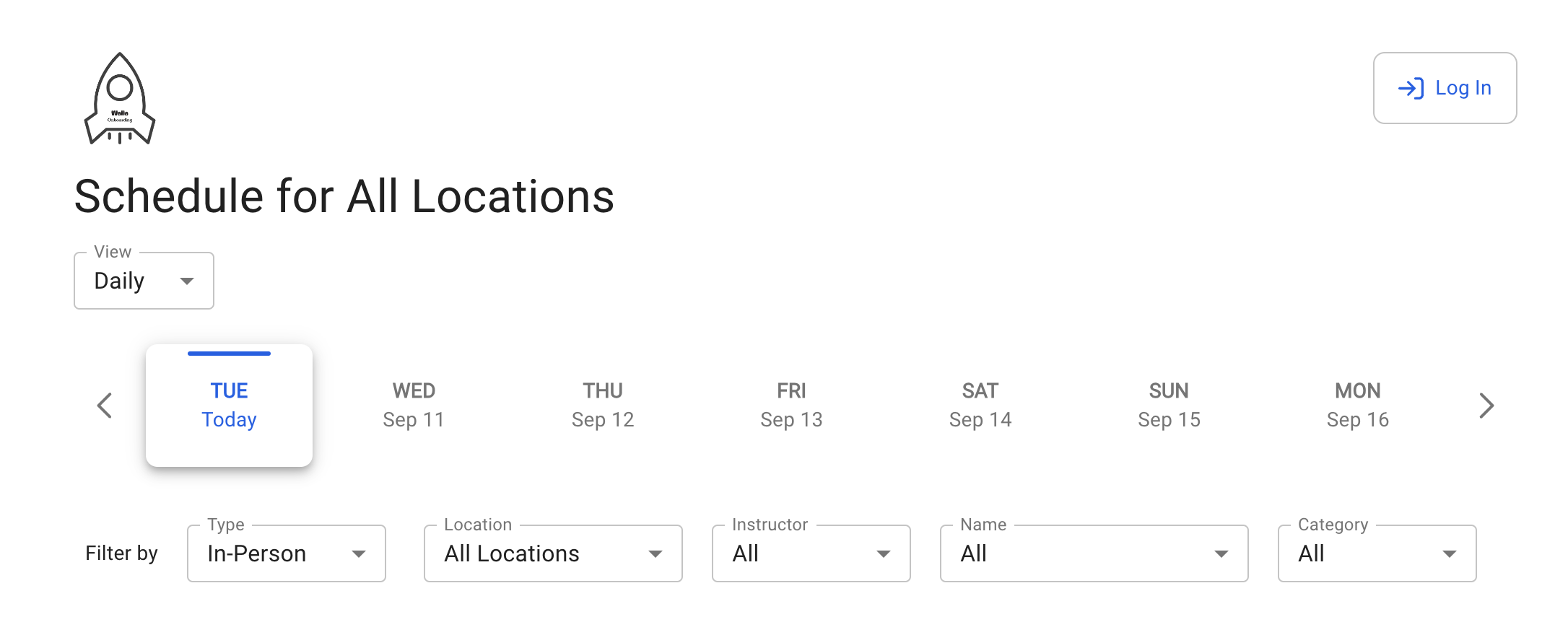
Client accounts can be created via any widget embedded on your studio's website. To quickly create an account at your studio, navigate to their schedule page and follow these steps.
Once you have created an account, you can then use the same login, aka email & password combination, to log in to the Walla App. It is important to note that logins are not created on the Walla App, they must be created via the widget, like we are about to show you here, or via a special invite email sent by the business.
[](https://downloads.intercomcdn.com/i/o/1175781895/b9a32ec4cd5d5e3fa80165b3/Screenshot+2024-09-10+at+7_39_16%E2%80%AFPM.png?expires=1776721500&signature=03eca993872a307afd696b4440c9d031e9c715e8b2cacda2f15d5840c8762171&req=dSEgE852nIlWXPMW1HO4zXWPwPjA037vZ9jsTKEuyB6VyMwP5nsyMJC2E8vg%0Au9Rl%2FzHEgMPKGVZOR%2Fg%3D%0A)
1. Locate the Log in button at the upper right hand corner of the schedule
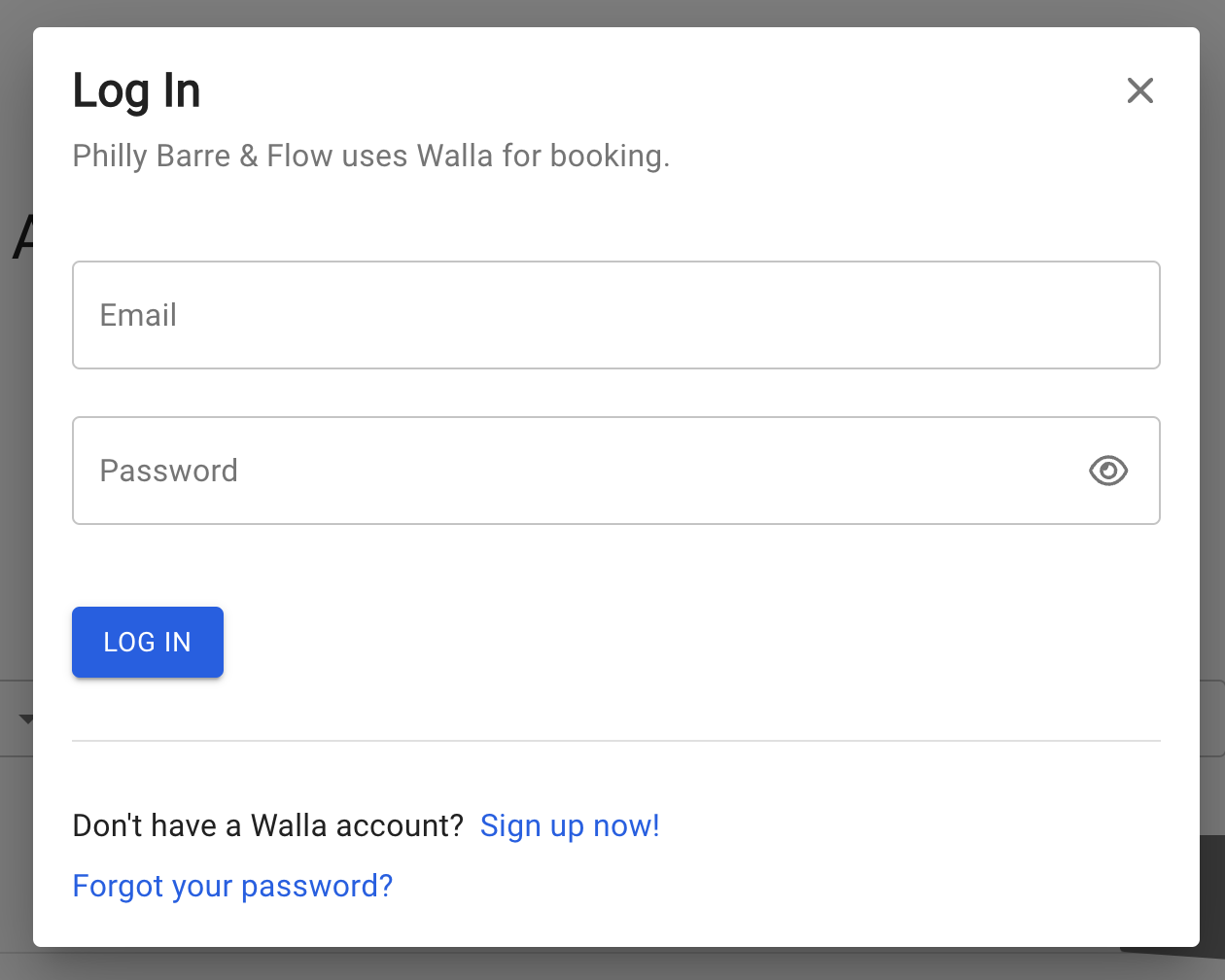
2. Once the Log In screen opens up, select **Don't have a Walla account? Sign up now!** to create your Account
3. Enter your email and continue following the prompts to create your account and set your password.
[](https://downloads.intercomcdn.com/i/o/1175782057/a834fd64b20509f2a93fa63f/Screenshot+2024-09-10+at+7_39_35%E2%80%AFPM.png?expires=1776721500&signature=e8b94a11eec5bd4876036e0fb3bbd5e3509587f2edff19e37edc779bb2c446f6&req=dSEgE852n4FaXvMW1HO4zXF60lM%2Bdik2YFJALpj3E42ttoG7FT%2FLyBV0kY2E%0ArdqRaoaLixktezRMjY0%3D%0A)
- [Getting Started with Walla](https://support.hellowalla.com/getting-started-with-walla?hsLang=en#main-content)
- [🤝 Onboarding](https://support.hellowalla.com/getting-started-with-walla?hsLang=en#onboarding)
- [Migrations](https://support.hellowalla.com/getting-started-with-walla?hsLang=en#migrations)
- [Products](https://support.hellowalla.com/products?hsLang=en)
- [Branded App](https://support.hellowalla.com/branded-app?hsLang=en)
- [Classes](https://support.hellowalla.com/classes?hsLang=en)
- [Managing Your Studio](https://support.hellowalla.com/managing-your-studio?hsLang=en)
- [Integrations](https://support.hellowalla.com/integrations?hsLang=en)
- [Enrollments](https://support.hellowalla.com/enrollments?hsLang=en)
- [WallaPredict](https://support.hellowalla.com/wallapredict?hsLang=en)
- [Franchise Features](https://support.hellowalla.com/franchise-features?hsLang=en)
- [Clients](https://support.hellowalla.com/clients?hsLang=en)
- [Sales & Marketing Center](https://support.hellowalla.com/sales-marketing-center?hsLang=en#main-content)
- [Sales Pipeline](https://support.hellowalla.com/sales-marketing-center?hsLang=en#sales-pipeline)
- [Conditions](https://support.hellowalla.com/sales-marketing-center?hsLang=en#conditions)
- [Builds](https://support.hellowalla.com/sales-marketing-center?hsLang=en#builds)
- [Google and Meta Integration](https://support.hellowalla.com/sales-marketing-center?hsLang=en#google-and-meta-integration)
- [Journeys and Audiences](https://support.hellowalla.com/sales-marketing-center?hsLang=en#journeys-and-audiences)
- [Virtual](https://support.hellowalla.com/virtual?hsLang=en)
- [Payments](https://support.hellowalla.com/payments?hsLang=en#main-content)
- [💰 Payments](https://support.hellowalla.com/payments?hsLang=en#payments)
- [Walla App](https://support.hellowalla.com/walla-app?hsLang=en)
- [Packs & Plans](https://support.hellowalla.com/packs-plans?hsLang=en)
- [Appointments](https://support.hellowalla.com/appointments?hsLang=en)
- [For Studio Clients](https://support.hellowalla.com/for-studio-clients?hsLang=en#main-content)
- [Using the Walla App](https://support.hellowalla.com/for-studio-clients?hsLang=en#using-the-walla-app)
- [Your Walla Login](https://support.hellowalla.com/for-studio-clients?hsLang=en#your-walla-login)
- [Using Walla Widgets](https://support.hellowalla.com/for-studio-clients?hsLang=en#using-walla-widgets)
- [Staff](https://support.hellowalla.com/staff?hsLang=en)
- [Reports](https://support.hellowalla.com/reports?hsLang=en)
- [Client Communication](https://support.hellowalla.com/client-communication?hsLang=en)
- [Memberships](https://support.hellowalla.com/memberships?hsLang=en)
- [Walla Websites](https://support.hellowalla.com/walla-websites?hsLang=en)
- [Walla FAQ's](https://support.hellowalla.com/walla-faqs?hsLang=en)
- [Walla Customer Service](https://support.hellowalla.com/walla-customer-service?hsLang=en)
- [Walla Subscription](https://support.hellowalla.com/walla-subscription?hsLang=en)
- [Merchant](https://support.hellowalla.com/merchant?hsLang=en)
- [Widgets](https://support.hellowalla.com/widgets?hsLang=en)
- [Retention Suite](https://support.hellowalla.com/retention-suite?hsLang=en)
[](https://www.hellowalla.com/)
[mailto:support@hellowalla.com](mailto:support@hellowalla.com)
Copyright © 2026, Walla Software