---
title: Walla Offset (Client Guide)
description: WallaOffset (Customer Guide)
---
[Skip to content](https://support.hellowalla.com/walla-offset-client-guide#main-content)
English
Show submenu for translations

Open main navigation
Close main navigation
- English
Show submenu for translations
How can we help you?
- There are no suggestions because the search field is empty.
1. [Walla Knowledge Base](https://support.hellowalla.com/?hsLang=en)
2. [Payments](https://support.hellowalla.com/payments?hsLang=en)
May 21, 2026
# Walla Offset (Client Guide)
Understanding why your clients may see two prices at checkout — and how to get the lower one.
**Why Do I See Two Different Prices?**
Your studio has a feature called Walla Offset enabled. This means that when you pay by credit card, a small processing fee (3.9%) is included in your price. If you pay with a bank account (ACH) or cash, you'll see a lower price — because those payment methods cost the studio less to process.
The price shown by default at checkout is always the credit card price. You can switch to a bank account or cash at checkout to see — and pay — the lower amount.
**Good to know:** The savings are shown to you in real time at checkout so you can choose what works best for you before confirming your purchase.
**How to Get the Lower Price**
- At checkout, look for the Payment Method section
- Switch from your credit card to your bank account (ACH) or cash
- The total will automatically update to reflect the lower price
- Complete your purchase — the savings are applied instantly
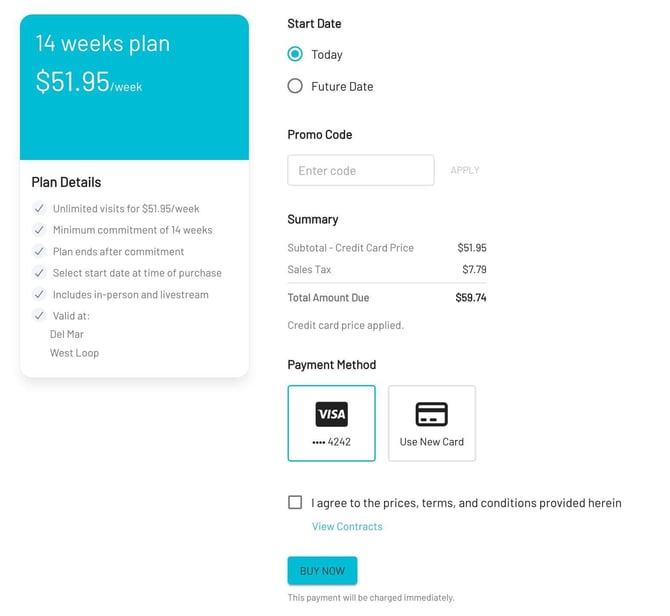
*Checkout — credit card price shown by default with savings prompt when switching to ACH*
### **Paying with a Gift Card or Promo Code**
If a gift card, promo code, or account balance covers your full purchase amount (total = $0), the credit card fee is removed automatically and you're switched to the lower cash price. No action needed on your end.
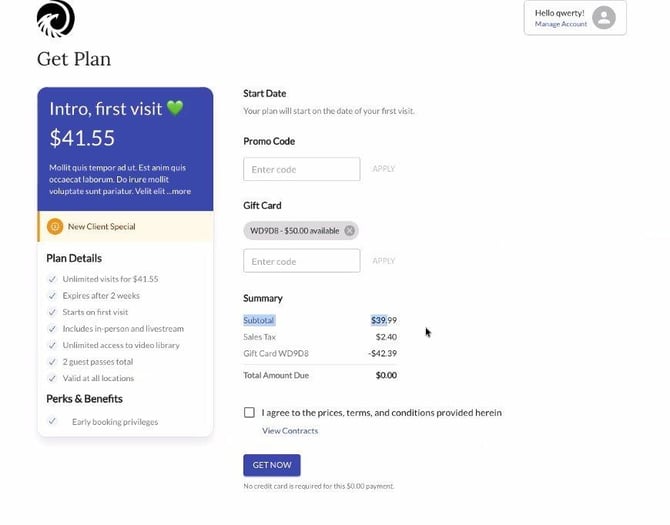
*Gift card covers full amount — system automatically switches to cash price ($0.00 due)*
**Pricing by Payment Method**
| **Payment Method** | **Price You Pay** |
| --- | --- |
| Credit card | Credit card price (includes 3.9% processing fee) |
| Bank account (ACH) | Lower cash price — no fee passed to you |
| Cash | Lower cash price — no fee passed to you |
| Apple Pay / Google Pay | Credit card price (always charged at card rate) |
| Gift card / promo covers 100% | Cash price applied automatically |
**What Will My Receipt Show?**
Your receipt will show the final amount you paid. There is no separate line item for the processing fee — the price you see is the price on your receipt.
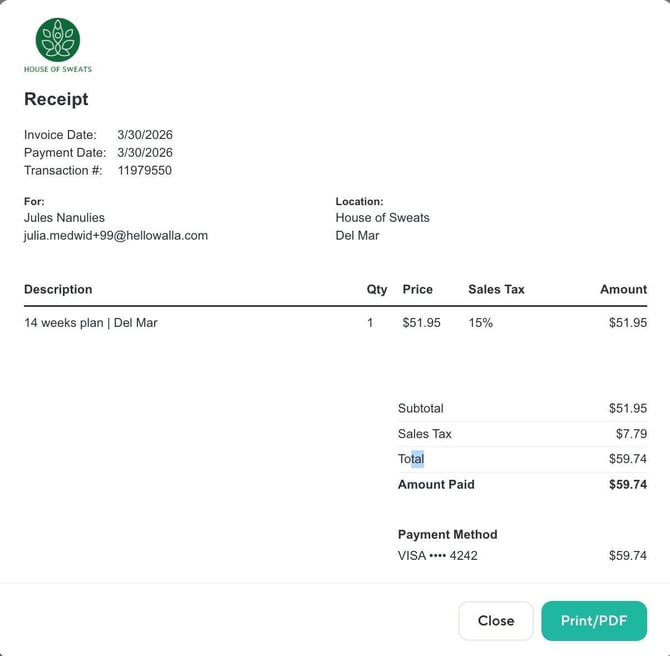
*Receipt — final amount paid with no separate fee line item*
**Frequently Asked Questions**
**Why is the price higher when I pay by credit card?**
Your studio uses Walla Offset, which includes a small credit card processing fee in the price for card payments. Paying by bank account or cash avoids that fee and gives you the lower price.
**Do I have to pay the higher price?**
No — if your studio has ACH (bank account) payments enabled, you can switch to that at checkout to get the lower price. You can add a bank account from your profile or during checkout.
**Will I always see two prices?**
The checkout defaults to the credit card price. If you select a bank account or cash as your payment method, the total updates to the lower price. The difference is shown to you before you confirm.
**Does this affect my refund?**
No — if you're refunded, you'll receive the full amount you originally paid, regardless of which payment method you used.
- [Getting Started with Walla](https://support.hellowalla.com/getting-started-with-walla?hsLang=en#main-content)
- [🤝 Onboarding](https://support.hellowalla.com/getting-started-with-walla?hsLang=en#onboarding)
- [Migrations](https://support.hellowalla.com/getting-started-with-walla?hsLang=en#migrations)
- [Products](https://support.hellowalla.com/products?hsLang=en)
- [Branded App](https://support.hellowalla.com/branded-app?hsLang=en)
- [Classes](https://support.hellowalla.com/classes?hsLang=en)
- [Managing Your Studio](https://support.hellowalla.com/managing-your-studio?hsLang=en)
- [Integrations](https://support.hellowalla.com/integrations?hsLang=en)
- [Enrollments](https://support.hellowalla.com/enrollments?hsLang=en)
- [WallaPredict](https://support.hellowalla.com/wallapredict?hsLang=en)
- [Franchise Features](https://support.hellowalla.com/franchise-features?hsLang=en)
- [Clients](https://support.hellowalla.com/clients?hsLang=en)
- [Sales & Marketing Center](https://support.hellowalla.com/sales-marketing-center?hsLang=en#main-content)
- [Sales Pipeline](https://support.hellowalla.com/sales-marketing-center?hsLang=en#sales-pipeline)
- [Conditions](https://support.hellowalla.com/sales-marketing-center?hsLang=en#conditions)
- [Builds](https://support.hellowalla.com/sales-marketing-center?hsLang=en#builds)
- [Google and Meta Integration](https://support.hellowalla.com/sales-marketing-center?hsLang=en#google-and-meta-integration)
- [Journeys and Audiences](https://support.hellowalla.com/sales-marketing-center?hsLang=en#journeys-and-audiences)
- [Virtual](https://support.hellowalla.com/virtual?hsLang=en)
- [Payments](https://support.hellowalla.com/payments?hsLang=en#main-content)
- [💰 Payments](https://support.hellowalla.com/payments?hsLang=en#payments)
- [Walla App](https://support.hellowalla.com/walla-app?hsLang=en)
- [Packs & Plans](https://support.hellowalla.com/packs-plans?hsLang=en)
- [Appointments](https://support.hellowalla.com/appointments?hsLang=en)
- [For Studio Clients](https://support.hellowalla.com/for-studio-clients?hsLang=en#main-content)
- [Using the Walla App](https://support.hellowalla.com/for-studio-clients?hsLang=en#using-the-walla-app)
- [Your Walla Login](https://support.hellowalla.com/for-studio-clients?hsLang=en#your-walla-login)
- [Using Walla Widgets](https://support.hellowalla.com/for-studio-clients?hsLang=en#using-walla-widgets)
- [Staff](https://support.hellowalla.com/staff?hsLang=en)
- [Reports](https://support.hellowalla.com/reports?hsLang=en)
- [Client Communication](https://support.hellowalla.com/client-communication?hsLang=en)
- [Memberships](https://support.hellowalla.com/memberships?hsLang=en)
- [Walla Websites](https://support.hellowalla.com/walla-websites?hsLang=en)
- [Walla FAQ's](https://support.hellowalla.com/walla-faqs?hsLang=en)
- [Walla Customer Service](https://support.hellowalla.com/walla-customer-service?hsLang=en)
- [Walla Subscription](https://support.hellowalla.com/walla-subscription?hsLang=en)
- [Merchant](https://support.hellowalla.com/merchant?hsLang=en)
- [Widgets](https://support.hellowalla.com/widgets?hsLang=en)
[](https://www.hellowalla.com/)
[mailto:support@hellowalla.com](mailto:support@hellowalla.com)
Copyright © 2026, Walla Software