---
title: Accommodating Historical Pricing For Migration
description: accommodating historical pricing for migration
---
[Skip to content](https://support.hellowalla.com/accommodating-historical-pricing-for-migration-walla-support-center#main-content)
English
Show submenu for translations

Open main navigation
Close main navigation
- English
Show submenu for translations
How can we help you?
- There are no suggestions because the search field is empty.
1. [Walla Knowledge Base](https://support.hellowalla.com/?hsLang=en)
2. [Getting Started with Walla](https://support.hellowalla.com/getting-started-with-walla?hsLang=en)
3. [Migrations](https://support.hellowalla.com/getting-started-with-walla?hsLang=en#migrations)
September 10, 2026
# Accommodating Historical Pricing For Migration
To prepare for your Walla migration, you'll want to ensure all necessary plans are created in your Walla site. If your studio has been open for many years or you have run pricing promotions in the past, you'll need to choose how to accommodate these varying prices in Walla.
### Map Pricing from Your Previous Software to Pricing in Walla
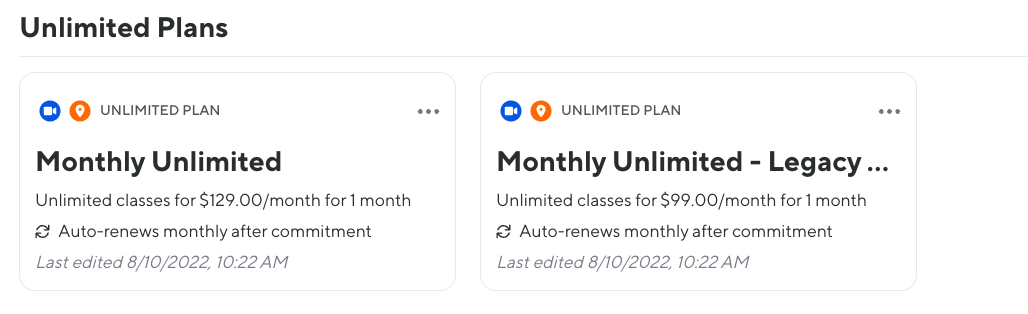
For example, if the current cost of your studio’s monthly unlimited is $129 per month but in the past the selling cost was $99, and you wish for those client’s to continue paying $99 per month after migration. There are two options for accommodating this:
**Option 1: Use the Price Override Feature on the Plan Map**
On the Plan Map sheet, you can use the **Price Override** feature to map multiple price points from your legacy plan into a single plan in Walla. This lets you consolidate all those varying rates under one plan without creating a separate plan for every price point.
**Option 2: Create a Tiered System or Legacy Plans**
If you want to retain visibility into which clients are on which legacy rate — so you can continue to bump up pricing for that group over time — create a tiered system of plans instead. Clients' rates might rise slightly to align with a tier, but only by a few dollars rather than a large jump, and this keeps each rate bucket separate and manageable for future price increases. See the table below for an example!

---
When you create this plan, add a signifier word that is easy to identify this plan - for example: Legacy Rate or Grandfathered Rate
[](https://downloads.intercomcdn.com/i/o/1050509170/f2fb7a5ce03a21b75a9f09d4/Screen+Shot+2022-08-10+at+10_24_48+AM.png?expires=1776721500&signature=f9e1f0fdd2851632e7a7b854f5288646eeaa2986adfc69d4cb64646561af1c01&req=dSAiFsx%2BlIBYWfMW1HO4zdOzwiTPWPF25J9ojN63w19wfscyyePgPxtl85%2BV%0AHgGRw%2B5MYywfViwo4vM%3D%0A)
If you have any questions about mapping your current pricing options correctly, please reach out to your Onboarding rep via welcome-team@hellowalla.com.
- [Getting Started with Walla](https://support.hellowalla.com/getting-started-with-walla?hsLang=en#main-content)
- [🤝 Onboarding](https://support.hellowalla.com/getting-started-with-walla?hsLang=en#onboarding)
- [Migrations](https://support.hellowalla.com/getting-started-with-walla?hsLang=en#migrations)
- [Products](https://support.hellowalla.com/products?hsLang=en)
- [Branded App](https://support.hellowalla.com/branded-app?hsLang=en)
- [Classes](https://support.hellowalla.com/classes?hsLang=en)
- [Managing Your Studio](https://support.hellowalla.com/managing-your-studio?hsLang=en)
- [Integrations](https://support.hellowalla.com/integrations?hsLang=en)
- [Enrollments](https://support.hellowalla.com/enrollments?hsLang=en)
- [WallaPredict](https://support.hellowalla.com/wallapredict?hsLang=en)
- [Franchise Features](https://support.hellowalla.com/franchise-features?hsLang=en)
- [Clients](https://support.hellowalla.com/clients?hsLang=en)
- [Sales & Marketing Center](https://support.hellowalla.com/sales-marketing-center?hsLang=en#main-content)
- [Sales Pipeline](https://support.hellowalla.com/sales-marketing-center?hsLang=en#sales-pipeline)
- [Conditions](https://support.hellowalla.com/sales-marketing-center?hsLang=en#conditions)
- [Builds](https://support.hellowalla.com/sales-marketing-center?hsLang=en#builds)
- [Google and Meta Integration](https://support.hellowalla.com/sales-marketing-center?hsLang=en#google-and-meta-integration)
- [Journeys and Audiences](https://support.hellowalla.com/sales-marketing-center?hsLang=en#journeys-and-audiences)
- [Virtual](https://support.hellowalla.com/virtual?hsLang=en)
- [Payments](https://support.hellowalla.com/payments?hsLang=en#main-content)
- [💰 Payments](https://support.hellowalla.com/payments?hsLang=en#payments)
- [Walla App](https://support.hellowalla.com/walla-app?hsLang=en)
- [Packs & Plans](https://support.hellowalla.com/packs-plans?hsLang=en)
- [Appointments](https://support.hellowalla.com/appointments?hsLang=en)
- [For Studio Clients](https://support.hellowalla.com/for-studio-clients?hsLang=en#main-content)
- [Using the Walla App](https://support.hellowalla.com/for-studio-clients?hsLang=en#using-the-walla-app)
- [Your Walla Login](https://support.hellowalla.com/for-studio-clients?hsLang=en#your-walla-login)
- [Using Walla Widgets](https://support.hellowalla.com/for-studio-clients?hsLang=en#using-walla-widgets)
- [Staff](https://support.hellowalla.com/staff?hsLang=en)
- [Reports](https://support.hellowalla.com/reports?hsLang=en)
- [Client Communication](https://support.hellowalla.com/client-communication?hsLang=en)
- [Memberships](https://support.hellowalla.com/memberships?hsLang=en)
- [Walla Websites](https://support.hellowalla.com/walla-websites?hsLang=en)
- [Walla FAQ's](https://support.hellowalla.com/walla-faqs?hsLang=en)
- [Walla Customer Service](https://support.hellowalla.com/walla-customer-service?hsLang=en)
- [Walla Subscription](https://support.hellowalla.com/walla-subscription?hsLang=en)
- [Merchant](https://support.hellowalla.com/merchant?hsLang=en)
- [Widgets](https://support.hellowalla.com/widgets?hsLang=en)
- [Retention Suite](https://support.hellowalla.com/retention-suite?hsLang=en)
[](https://www.hellowalla.com/)
[mailto:support@hellowalla.com](mailto:support@hellowalla.com)
Copyright © 2026, Walla Software