
Everything you need to know about enabling and managing ACH payments for your studio.
Enabling ACH Walkthrough Video
OverviewACH allows your clients to pay directly from their bank account at a lower processing fee (1.8%) than credit cards. You enable and manage ACH from Business Settings — clients handle their own bank account setup independently.
Note: ACH is a standalone feature. You do not need Walla Offset enabled to accept ACH payments. These are two separate features that can be used independently of one another.
Important: ACH is not instant — processing takes 3–10 business days. Payments show as successful at time of purchase, but failures can occur after services have already been used.
Enabling & Managing ACH
- Enable or disable ACH in Business Settings
- Default processing fee: 1.8% — this is absorbed by your studio and is not passed to clients
- ACH can be enabled without Walla Offset
- ACH must be enabled if you want to use Walla Offset — but Walla Offset is not required to accept ACH payments
- Changes take effect immediately
When Disabling ACH
- Payments already initiated will still process normally
- Upcoming scheduled payments — including recurring plans and enrollments — will fail
Heads up: If you have Walla Offset enabled and disable ACH, Walla Offset will automatically be disabled as well.
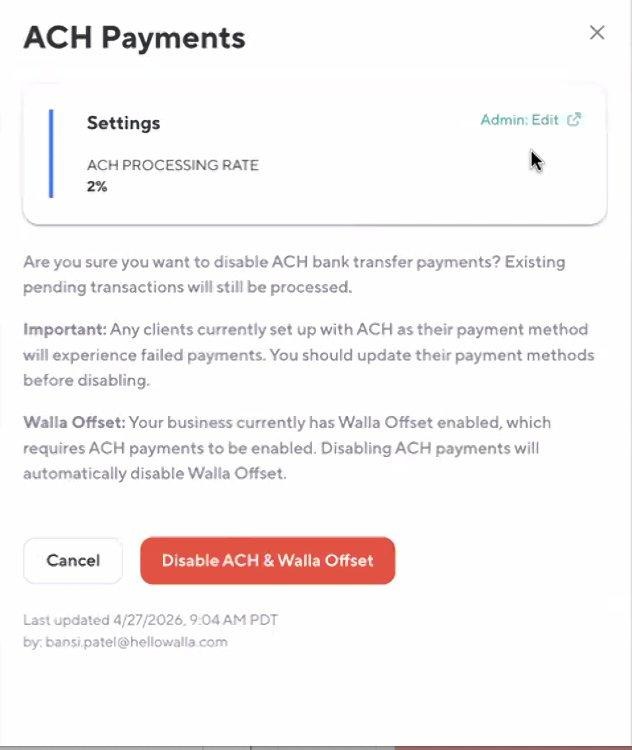
Business Settings — ACH disable confirmation modal
What ACH Can (and Cannot) Be Used For
|
Purchase Type |
ACH Supported? |
|
Class drop-ins |
Yes |
|
Appointment bookings |
Yes (listed under drop-ins at front desk) |
|
Enrollment payment plans |
Yes (installment payments) |
|
Plan purchases & recurring billing |
Yes |
|
Retail & gift card purchases |
No |
|
Late cancel / no-show fees |
No |
|
Split payments |
No |
|
Charges requiring immediate confirmation |
No — credit card required |
ACH cannot be set as a client's default payment method. If a client has only ACH on file and a fee is triggered, it will be added to their account balance instead.
Front Desk Usage
- Staff can process ACH only if the client already has a bank account saved to their profile
- Staff cannot add a bank account on a client's behalf — clients must complete setup themselves via the Walla App or Widget
- If a client's bank is not supported, ACH will not appear as a payment option
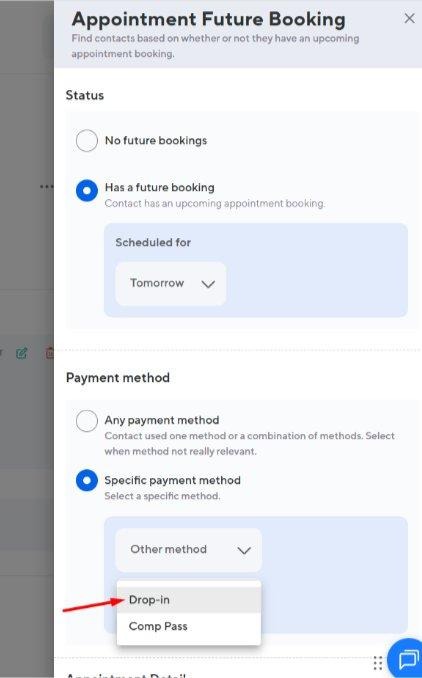
Front desk — ACH available under Drop-in when booking an appointment
Failed Payment Scenarios
Because ACH takes 3–10 days to process, failures may occur after services have been used. Here's how Walla handles each scenario:
|
Scenario |
What Happens |
|
Class already attended |
Visit stays valid; amount added to client's account balance |
|
Class not yet used |
Booking is cancelled |
|
Appointment — past bookings |
Remain valid; converted to account balance owed |
|
Appointment — future bookings |
Automatically cancelled |
|
Weekly recurring plan |
Cancelled immediately on first failure (no retries) |
|
Monthly recurring plan |
Up to 3 retry attempts, then cancelled |
|
Cancellation within window |
Late cancel / no-show penalties still apply |
Refunds
- Full and partial refunds supported across plans, classes, appointments, and enrollments
- Refunds are always returned to the client's original bank account — processing time 3–10 business days
- If a payment is still processing, it may need to be cancelled rather than refunded depending on timing
Transaction flow: Processing → Completed → Refunded
Quick Reference
|
Setting |
Details |
|
Processing fee |
1.8% (absorbed by the studio) |
|
Processing time |
3–10 business days |
|
Default payment method |
Cannot be set as default |
|
Who sets up bank account |
Client only — staff cannot add on their behalf |
|
Walla Offset requirement |
ACH must be enabled to use Walla Offset — but Walla Offset is not required for ACH |
|
Weekly plan failure |
Cancelled immediately on first failure |
|
Monthly plan failure |
Up to 3 retries, then cancelled |
|
Refund destination |
Always returned to client's original bank account |