
Easily copy and enter your Google Tag ID into Walla—and our widgets will automatically send event data to your Google Analytics dashboard
If you use Google Analytics 4 to track user behavior, Walla makes it simple to connect your data. With just one tag, you can monitor key actions like bookings, purchases, and page views directly from your Walla widgets—no coding or manual setup required.
How Tracking Works
Walla supports one Google Analytics tag (gtag.js) per business. This tag tracks all activity across your Walla platform and embedded widgets.
If your business operates multiple locations or franchises:
-
All locations share the same tracking ID
-
Location-specific tags are not supported
-
All data is rolled up into a single Google Analytics account
Widget Embed Behavior
Walla widget embed codes are not location-specific. Each business uses one universal code that applies the same Google Tag across all widgets.
While some platforms allow location-level analytics by customizing embed codes, Walla maintains a unified setup to ensure accurate, stable tracking. That means:
-
There's no need to manually configure tags for each location
-
All widget activity is tracked at the business level
What’s Tracked in Google Analytics
Once your Google Tag is connected, Walla automatically tracks key customer actions using Google’s recommended GA4 events.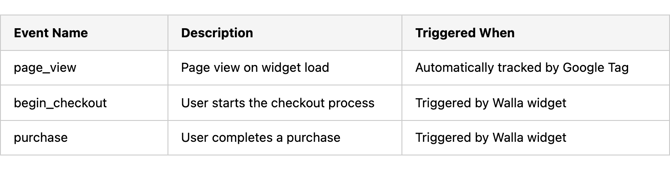
These events apply to:
-
Plan checkouts
-
Class purchases
-
Appointment bookings
-
Enrollment registrations
Google Tag vs. Google Tag Manager
Important: Walla supports Google Tag (gtag.js) — not Google Tag Manager (GTM).
While their names sound similar, they are different tools: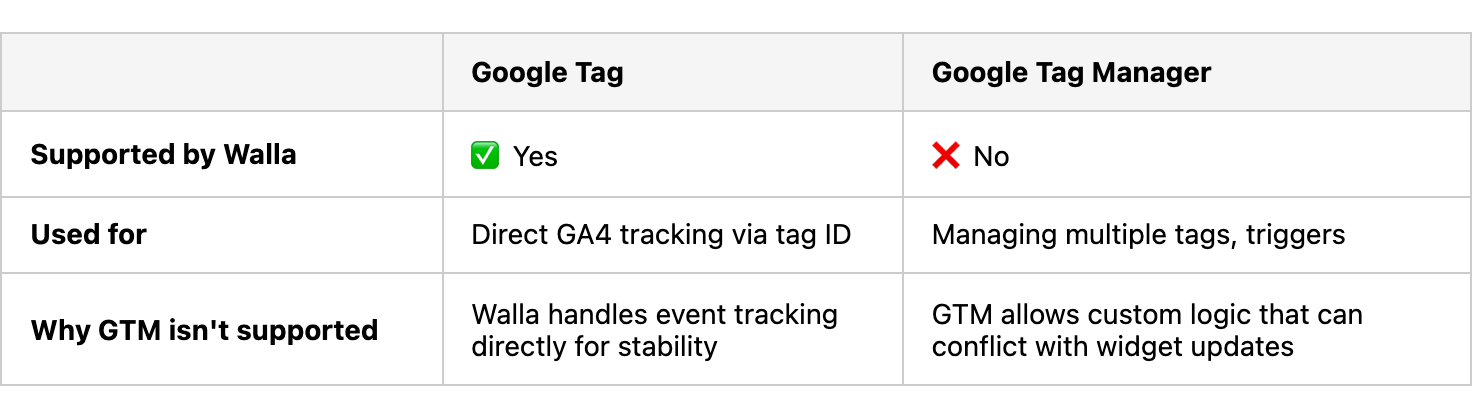
If a GTM container ID (e.g. GTM-XXXXXXX) is entered into Walla, the system will flag it as invalid.
Setup Instructions
Setting up Google Analytics in Walla is quick and easy:
-
Go to Sales & Marketing Center in your Walla admin
-
Scroll to the Google Analytics tile and click Set
-
Enter your Google Tag ID (starts with
G-)-
Need help finding your tag? Click here
-
-
Choose your Purchase Event Name:
-
Standard (recommended)
-
Or select Custom
-
-
Click Save
🎉 That’s it! Events will begin sending to your GA4 dashboard. It may take up to 24 hours for events to appear.