Lead Tracker updates
The Lead Tracker has been refreshed to make managing and prioritizing leads easier than ever. The updated table layout highlights key lead details, provides clearer visibility into follow-ups, and introduces a new AI-powered lead scoring breakdown
Why it Matters
This update introduces AI-powered lead scoring to give studios clear, data-driven insights into which leads are most likely to convert. The lead score is calculated using multiple factors, including engagement activity, distance from the studio, referral source, and demographic indicators, to help studios better understand lead potential and prioritize follow-up actions.
In addition to this new scoring insight, the Lead Tracker table layout has been refined for improved visibility and workflow efficiency.
Functionality
Table Updates
-
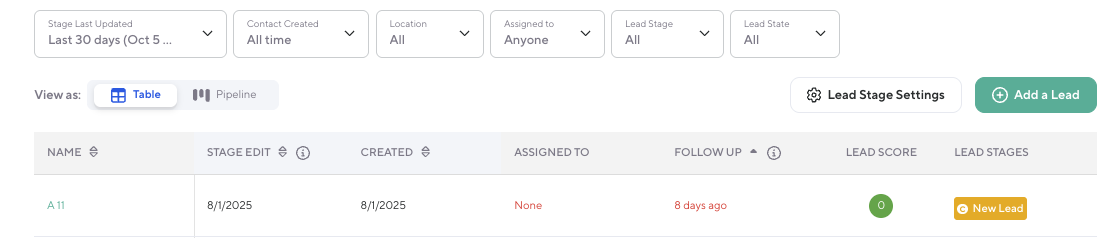
Name: Moved to the first column for faster scanning (previously column five).
-
Stage Edit: Displays the date the lead’s stage was last updated.
-
Field name updated from “Stage Update” to “Stage Edit.”
-
-
Created Date: Shows when the lead was initially added.
-
Assigned To: Displays the staff member assigned to the lead.
-
If unassigned, “None” appears in red for visibility (no change in functionality)
-
-
Follow Up: Follow-up dates that are overdue or due today are displayed in red to highlight urgency.
Name: Moved to the first column for faster scanning (previously column five).
Stage Edit: Displays the date the lead’s stage was last updated.
Field name updated from “Stage Update” to “Stage Edit.”
Field name updated from “Stage Update” to “Stage Edit.”
Created Date: Shows when the lead was initially added.
Assigned To: Displays the staff member assigned to the lead.
If unassigned, “None” appears in red for visibility (no change in functionality)
If unassigned, “None” appears in red for visibility (no change in functionality)
Follow Up: Follow-up dates that are overdue or due today are displayed in red to highlight urgency.
Lead Score Details
-
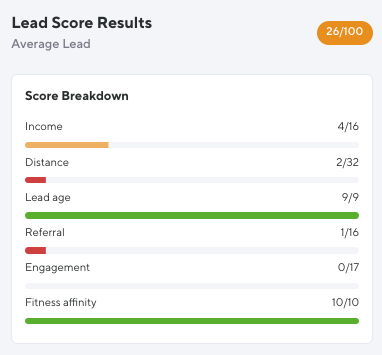
If a lead has a lead score result, you can now click the score to open a slide-in panel with a full breakdown.
-
The score breakdown includes:
-
Income
-
Distance
-
Lead Age
-
Referral
-
Engagement
-
Fitness Affinity
-
-
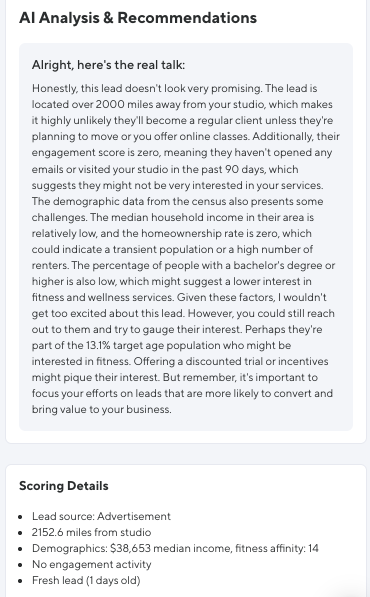
Each factor is calculated using an AI analysis that considers factors such as:
-
Proximity to the studio
-
Demographic indicators
-
Engagement activity (ie: unopened emails, missed visits)
-
If a lead has a lead score result, you can now click the score to open a slide-in panel with a full breakdown.
The score breakdown includes:
Income
Income
Distance
Distance
Lead Age
Lead Age
Referral
Referral
Engagement
Engagement
Fitness Affinity
Fitness Affinity
Each factor is calculated using an AI analysis that considers factors such as:
Proximity to the studio
Proximity to the studio
Demographic indicators
Demographic indicators
Engagement activity (ie: unopened emails, missed visits)
Engagement activity (ie: unopened emails, missed visits)