
Selling memberships or plans before opening generates early revenue and helps gauge interest in the studio's offerings, providing valuable insights into your target demographics preferences. It can also create a sense of exclusivity and anticipation among potential members, fostering a community before the studio even opens its doors.
Presale Plan Set Up
Typical presale plans offer a discount or incentive for committing early. You can offer these incentives in two ways:
Create a Presale (Founding Members) Plan
Create a special recurring membership or plan that is only for presales only. Many studios call folks who purchase this plan “founders” so the offer could be “Founders Monthly Unlimited”.
Create a Presale Promo Code
Create your regular pricing for recurring membership and use a promo code to discount the plan for all of the payments or just a few. For example, if you want to offer those who join early $50 off their first 6 months of membership, you can create a promo code and promote that as your presale offer. You can also use promo codes to limit the number of offers sold. This setting is found under the Promo Code configuration and is helpful if you only want to offer a limited number of presale plans.
Presale Plan Settings
Starts On First Visit and Pay Now
☝️Walla’s Recommended Presale Plan Configuration
Set Plan Starts On to On a specific date and choose your opening date. Clients pay at checkout, their plan stays Pending, and every presale buyer activates together on your opening date, whether or not they’ve visited yet. If your opening date changes, update it once on the plan and all pending plans move with it.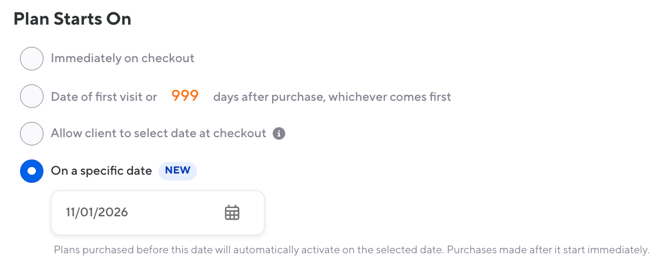
For full setup steps, see Start a Plan on a Specific Date.
Client Chooses Start Date and Pays On Plan Start Date
If you do not wish to charge your clients for their first payment during presales and rather charge them later, you can configure your presale plan to charge the client on start date and allow the client to choose the plan start date.
Plan starts on Allow client to select date at checkout: You will need to add in the plan description the date the client should choose for their start date. There is not a plan setting that is Starts on first visit and charge on first visit. Plans that start on first visit can only be charged immediately.

First payment due On plan start date: Clients will be charged the day their plan starts. Based on the previous setting, this will be the date chosen by the client.

Your clients must select a future date when purchasing a this presale plan at checkout.
⚡ Pro tip Clearly communicate the terms of the presale plans to your clients and set realistic expectations regarding plan activation and payment. Be sure to enable the Plan Purchase notification Transactional Notification.
By configuring your presale plans with these settings, you can:
✔️Allow clients to purchase plans in advance of your grand opening and select a start date that aligns with your launch.
✔️ Defer payment for the presale plans until the selected start date, which means you won't receive funds until your business officially opens.
✔️ Ensure that the presale plans only become active and paid for on the chosen start date, which should be on or after your grand opening date.
Other important considerations:
✔️ To avoid clients starting their billing cycle prior to you’re opening, do not allow clients to book classes until you have a confirmed open date. You can schedule classes and post your schedule widget but be sure to edit the Booking & Waitlist settings under each class type to be “Bookable by = Nobody”.
✔️ If you want to use the “Plans & Pricing” widget on your website, you’ll need to add a Class Type into Walla first to ensure the plans are visible on the widget.